PhantomLegs

Virtual Reality (VR) sickness occurs when exposure to a virtual environment causes symptoms that are similar to motion sickness, and has been one of the major user experience barriers of VR. To reduce VR sickness, prior work has explored dynamic field-of-view modification and galvanic vestibular stimulation (GVS) that recou-ples the visual and vestibular systems. We propose a new approach to reduce VR sickness, called PhantomLegs, that applies alternating haptic cues that are synchronized to users’ footsteps in VR. Our prototype consists of two servos with padded swing arms, one set on each side of the head, that lightly taps the head as users walk in VR. We conducted a three-session, multi-day user study with 30 participants to evaluate its effects as users navigate through a VR environment while physically being seated. Results show that our approach significantly reduces VR sickness during the initial exposure while remaining comfortable to users.
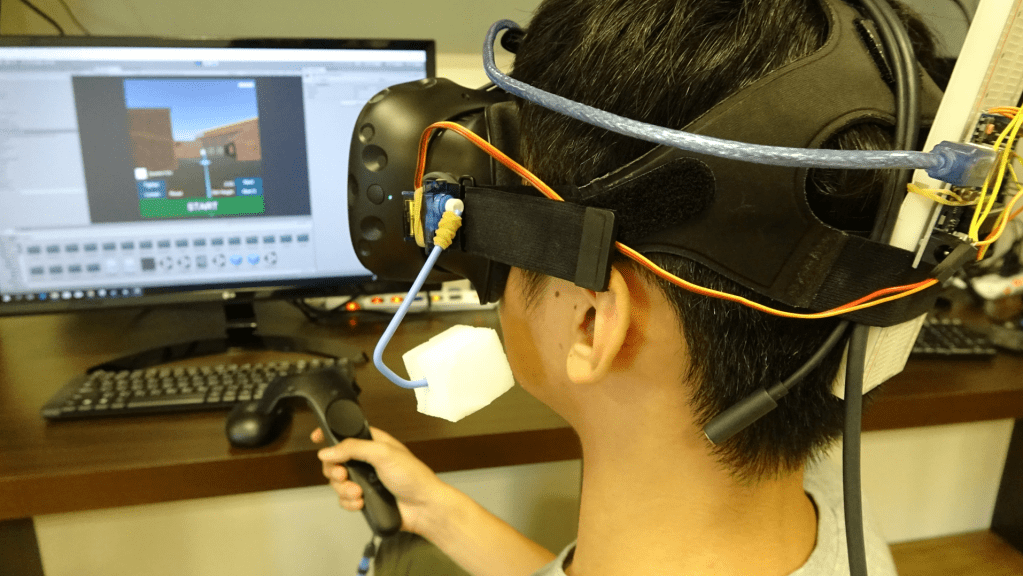
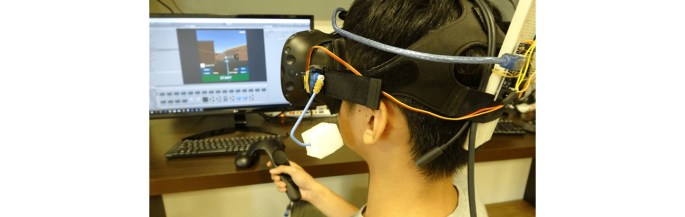
A seated participant navigating in the virtual environment with HTC Vive HMD and controller, assisted by PhantomLegs haptic device.

PhantomLegs: Reducing Virtual Reality Sickness Using Head-Worn Haptic Devices

S. Liu, N. Yu, L. Chan, Y. Peng, W. Sun and M. Y. Chen, “PhantomLegs: Reducing Virtual Reality Sickness Using Head-Worn Haptic Devices,” 2019 IEEE Conference on Virtual Reality and 3D User Interfaces (VR), Osaka, Japan, 2019, pp. 817-826.
DOI: https://doi.org/10.1109/VR.2019.8798158
PeriText

Augmented Reality (AR) provides real-time information by superimposing virtual information onto users’ view of the real world. Our work is the first to explore how peripheral vision, instead of central vision, can be used to read text on AR and smart glasses. We present Peritext, a multiword reading interface using rapid serial visual presentation (RSVP). This enables users to observe the real world using central vision, while using peripheral vision to read virtual information. We first conducted a lab-based study to determine the effect of different text transformation by comparing reading efficiency among 3 capitalization schemes, 2 font faces, 2 text animation methods, and 3 different numbers of words for RSVP paradigm. We found that title case capitalization, sans-serif font and word-wise typewriter animation with multiword RSVP display resulted in better reading efficiency, which together formed our Peritext design. Another lab-based study followed, investigating the performance of the Peritext against control text, and the results showed significant better performance. Finally, we conducted a field study to collect user feedback while using Peritext in real-world walking scenarios, and all users reported a preference of 5° eccentricity over 8°.

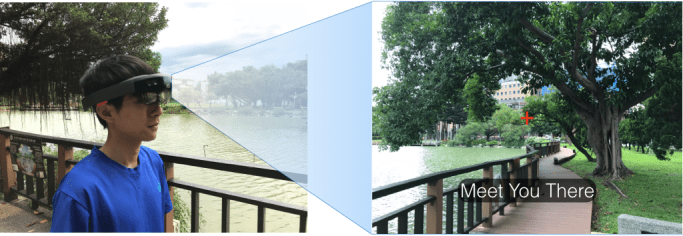
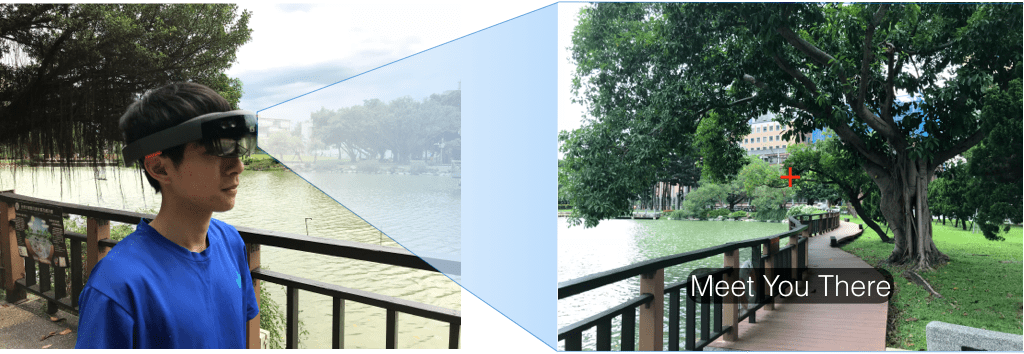
PeriText is a multiword reading interface for peripheral vision on augmented reality smart glasses. While (left) users focus on tasks in the real world such as walking, (right) PeriText provides realtime text information using rapid serial visual presentation, with words sequentially displayed below their center gaze, represented by the red crosshair.

PeriText: Utilizing Peripheral Vision for Reading Text on Augmented Reality Smart Glasses

P. Ku, Y. Lin, Y. Peng and M. Y. Chen, “PeriText: Utilizing Peripheral Vision for Reading Text on Augmented Reality Smart Glasses,” 2019 IEEE Conference on Virtual Reality and 3D User Interfaces (VR), Osaka, Japan, 2019, pp. 630-635.
DOI: https://doi.org/10.1109/VR.2019.8798065

PersonalTouch

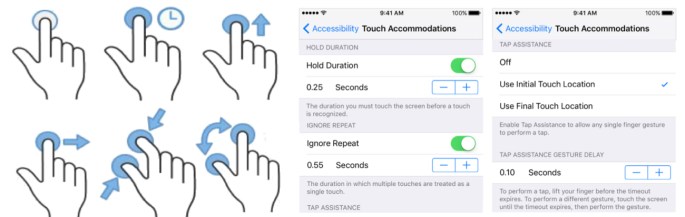
Modern touchscreen devices have recently introduced customizable touchscreen settings to improve accessibility for users with motor impairments. For example, iOS 10 introduced the following four Touch Accommodation settings: 1) Hold Duration, 2) Ignore Repeat, 3) Tap Assistance, and 4) Tap Assistance Gesture Delay. These four independent settings lead to a total of more than 1 million possible configurations, making it impractical to manually determine the optimal settings. We present PersonalTouch, which collects and analyzes touchscreen gestures performed by individual users, and recommends personalized, optimal touchscreen accessibility settings. Results from our user study show that PersonalTouch significantly improves touch input success rate for users with motor impairments (20.2%, N=12, p=.00054) and for users without motor impairments (1.28%, N=12, p=.032).

PersonalTouch first collects touchscreen gestures, and then recommends personalized, optimal accessibility settings.

PersonalTouch: Improving Touchscreen Usability by Personalizing Accessibility Settings based on Individual User’s Touchscreen Interaction

Yi-Hao Peng, Muh-Tarng Lin, Yi Chen, TzuChuan Chen, Pin Sung Ku, Paul Taele, Chin Guan Lim, and Mike Y. Chen. 2019. PersonalTouch: Improving Touchscreen Usability by Personalizing Accessibility Settings based on Individual User’s Touchscreen Interaction. In Proceedings of the 2019 CHI Conference on Human Factors in Computing Systems (CHI ’19). Association for Computing Machinery, New York, NY, USA, Paper 683, 1–11.
DOI: https://doi.org/10.1145/3290605.3300913

ARPilot


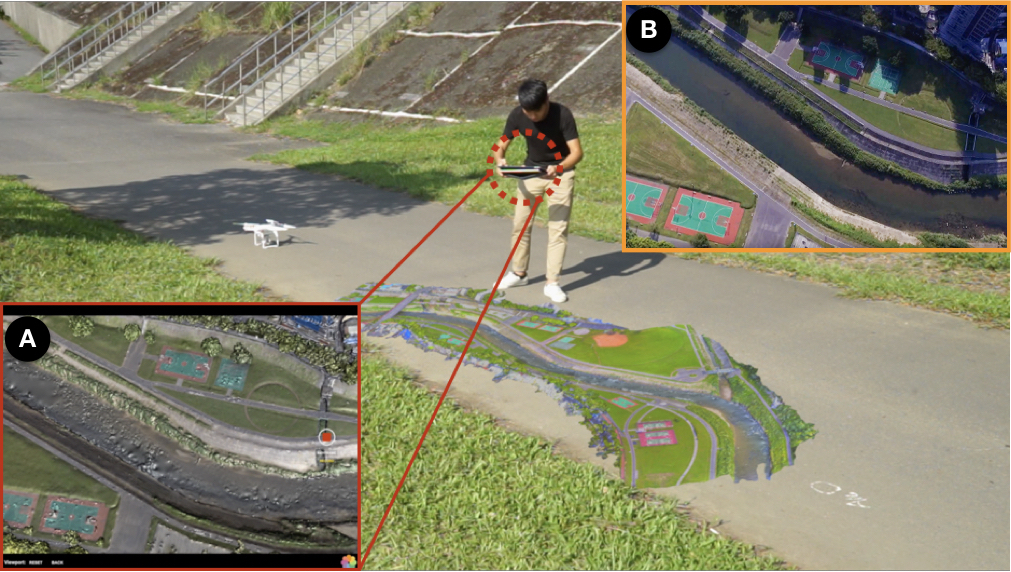
Drones offer camera angles that are not possible with traditional cam- eras and are becoming increasingly popular for videography. However, fly- ing a drone and controlling its camera simultaneously requires manipulating 5-6 degrees of freedom (DOF) that needs significant training. We present ARPilot, a direct-manipulation interface that lets users plan an aerial video by physically moving their mobile devices around a miniature 3D model of the scene, shown via Augmented Reality (AR). The mobile devices act as the viewfinder, making them intuitive to explore and frame the shots. We leveraged AR technology to explore three 6DOF video-shooting interfaces on mobile devices: AR keyframe, AR continuous, and AR hybrid, and compared against a traditional touch interface in a user study. The results show that AR hybrid is the most preferred by the participants and expends the least effort among all the techniques, while the users’ feedback suggests that AR continu- ous empowers more creative shots. We discuss several distinct usage patterns and report insights for further design.

ARPilot is a direct-manipulation tool that facilitates route planning for aerial drones.

ARPilot: designing and investigating AR shooting interfaces on mobile devices for drone videography

Yu-An Chen, Te-Yen Wu, Tim Chang, Jun You Liu, Yuan-Chang Hsieh, Leon Yulun Hsu, Ming-Wei Hsu, Paul Taele, Neng-Hao Yu, and Mike Y. Chen. 2018. ARPilot: designing and investigating AR shooting interfaces on mobile devices for drone videography. In Proceedings of the 20th International Conference on Human-Computer Interaction with Mobile Devices and Services (MobileHCI ’18). Association for Computing Machinery, New York, NY, USA, Article 42, 1–8.
DOI: https://doi.org/10.1145/3229434.3229475

SpeechBubbles

Deaf and hard-of-hearing (DHH) individuals encounter difficulties when engaged in group conversations with hearing individuals, due to factors such as simultaneous utterances from multiple speakers and speakers whom may be potentially out of view.
We interviewed and co-designed with eight DHH participants to address the following challenges:
1)~associating utterances with speakers,
2)~ordering utterances from different speakers,
3)~displaying optimal content length, and
4)~visualizing utterances from out-of-view speakers.
We evaluated multiple designs for each of the four challenges through a user study with twelve DHH participants.
Our study results showed that participants significantly preferred speech bubble visualizations over traditional captions.
These design preferences guided our development of SpeechBubbles, a real-time speech recognition interface prototype on an augmented reality head-mounted display.
From our evaluations, we further demonstrated that DHH participants preferred our prototype over traditional captions for group conversations.

SpeechBubbles: Enhancing Captioning Experiences for Deaf and Hard-of-Hearing People in Group Conversations

Yi-Hao Peng, Ming-Wei Hsi, Paul Taele, Ting-Yu Lin, Po-En Lai, Leon Hsu, Tzu-chuan Chen, Te-Yen Wu, Yu-An Chen, Hsien-Hui Tang, and Mike Y. Chen. 2018. SpeechBubbles: Enhancing Captioning Experiences for Deaf and Hard-of-Hearing People in Group Conversations. In Proceedings of the 2018 CHI Conference on Human Factors in Computing Systems (CHI ’18). Association for Computing Machinery, New York, NY, USA, Paper 293, 1–10.
DOI: https://doi.org/10.1145/3173574.3173867

ActiveErgo

Proper ergonomics improves productivity and reduces risks for injuries such as tendinosis, tension neck syndrome, and back injuries. Despite having ergonomics standards and guidelines for computer usage since the 1980s, injuries due to poor ergonomics remain widespread. We present ActiveErgo, the first active approach to improving ergonomics by combining sensing and actuation of motorized furniture. It provides automatic and personalized ergonomics of computer workspaces in accordance to the recommended ergonomics guidelines. Our prototype system uses a Microsoft Kinect sensor for skeletal sensing and monitoring to determine the ideal furniture positions for each user, then uses a combination of automatic adjustment and real-time feedback to adjust the computer monitor, desk, and chair positions. Results from our 12-person user study demonstrated that ActiveErgo significantly improves ergonomics compared to manual configuration in both speed and accuracy, and helps significantly more users to fully meet ergonomics guidelines.

ActiveErgo: Automatic and Personalized Ergonomics using Self-actuating Furniture

Yu-Chian Wu, Te-Yen Wu, Paul Taele, Bryan Wang, Jun-You Liu, Pin-sung Ku, Po-En Lai, and Mike Y. Chen. 2018. ActiveErgo: Automatic and Personalized Ergonomics using Self-actuating Furniture. In Proceedings of the 2018 CHI Conference on Human Factors in Computing Systems (CHI ’18). Association for Computing Machinery, New York, NY, USA, Paper 558, 1–8.
DOI: https://doi.org/10.1145/3173574.3174132

CurrentViz

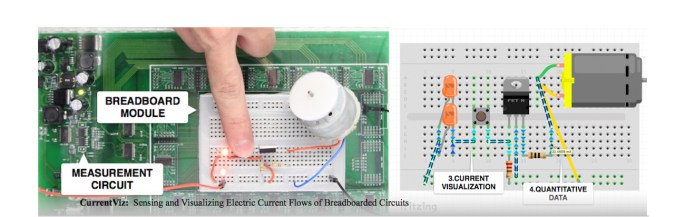
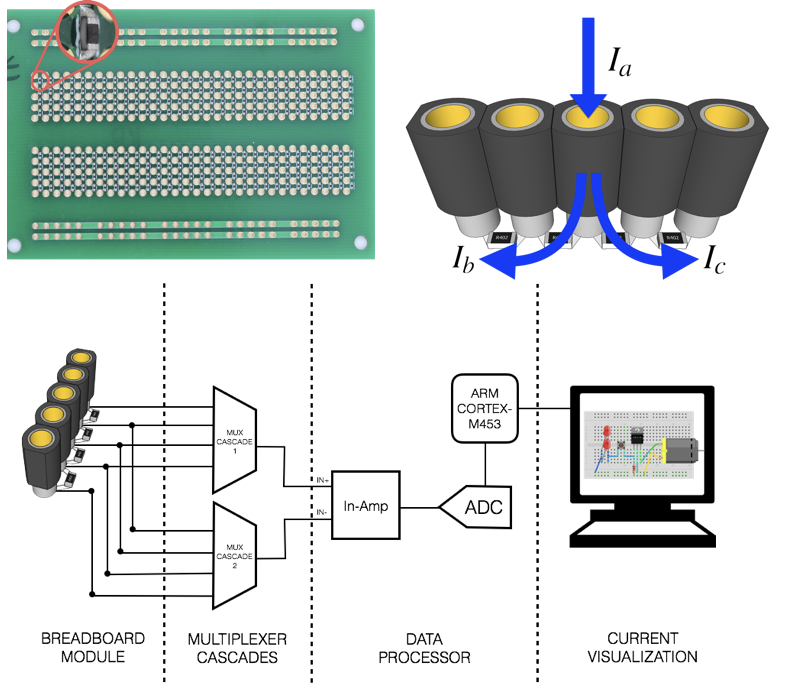
Electric current and voltage are fundamental to learning, understanding, and debugging circuits. Although both can be measured using tools such as multimeters and oscilloscopes, electric current is much more difficult to measure because users have to unplug parts of a circuit and then insert the measuring tools in serial. Furthermore, users need to restore the circuits back to its original state after measurements have been taken. In practice, this cumbersome process poses a formidable barrier to knowing how current flows throughout a circuit. We present CurrentViz, a system that can sense and visualize the electric current flowing through a circuit, which helps users quickly understand otherwise invisible circuit behavior. It supports fully automatic, ubiquitous, and real-time collection of amperage information of breadboarded circuits. It also supports visualization of the amperage data on a circuit schematic to provide anintuitive view into the current state of a circuit.

FigureCollection

CurrentViz:Sensing and Visualizing Electric Current Flows of Breadboarded Circuits

Te-Yen Wu, Hao-Ping Shen, Yu-Chian Wu, Yu-An Chen, Pin-Sung Ku, Ming-Wei Hsu, Jun-You Liu, Yu-Chih Lin, and Mike Y. Chen. 2017. CurrentViz: Sensing and Visualizing Electric Current Flows of Breadboarded Circuits. In Proceedings of the 30th Annual ACM Symposium on User Interface Software and Technology (UIST ’17). Association for Computing Machinery, New York, NY, USA, 343–349.
DOI: https://doi.org/10.1145/3126594.3126646

CircuitSense

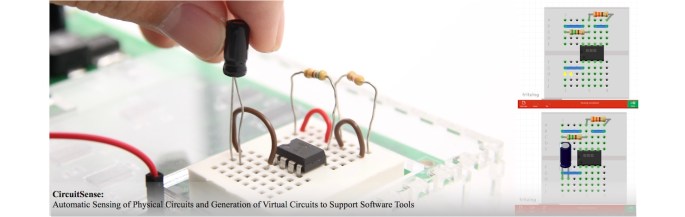
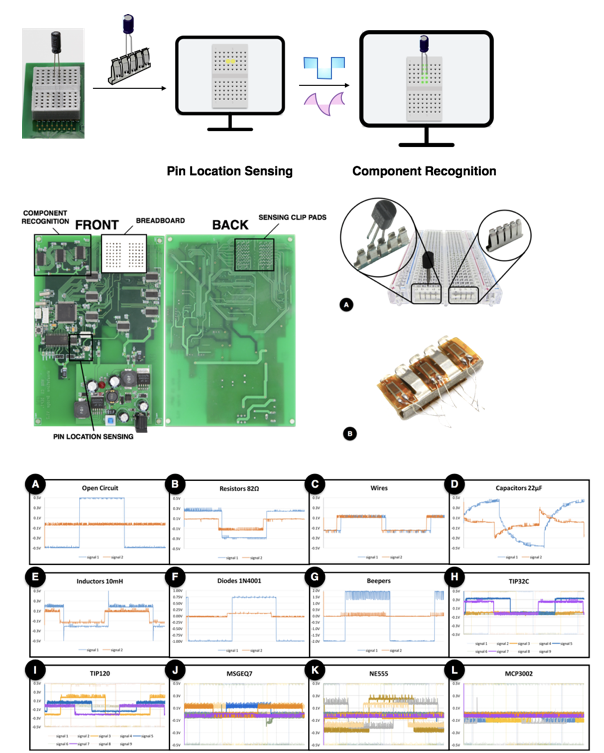
The rise of Maker communities and open-source electronic prototyping platforms have made electronic circuit projects increasingly popular around the world. Although there are software tools that support the debugging and sharing of circuits, they require users to manually create the virtual circuits in software, which can be time-consuming and error-prone. We present CircuitSense, a system that automatically recognizes the wires and electronic components placed on breadboards. It uses a combination of passive sensing and active probing to detect and generate the corresponding circuit representation in software in real-time. CircuitSense bridges the gap between the physical and virtual representations of circuits. It enables users to interactively construct and experiment with physical circuits while gaining the benefits of using software tools. It also dramatically simplifies the sharing of circuit designs with online communities.

webpage_figure

CircuitSense: Automatic Sensing of Physical Circuits and Generation of Virtual Circuits to Support Software Tools

Te-Yen Wu, Bryan Wang, Jiun-Yu Lee, Hao-Ping Shen, Yu-Chian Wu, Yu-An Chen, Pin-Sung Ku, Ming-Wei Hsu, Yu-Chih Lin, and Mike Y. Chen. 2017. CircuitSense: Automatic Sensing of Physical Circuits and Generation of Virtual Circuits to Support Software Tools. In Proceedings of the 30th Annual ACM Symposium on User Interface Software and Technology (UIST ’17). Association for Computing Machinery, New York, NY, USA, 311–319.
DOI: https://doi.org/10.1145/3126594.3126634

CircuitStack

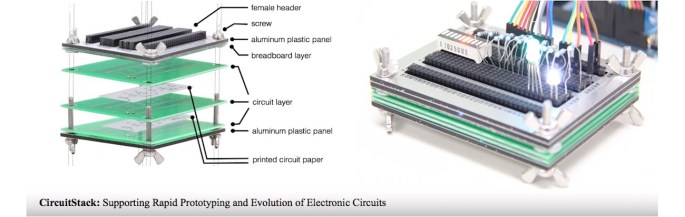
For makers and developers, circuit prototyping is an integral part of building electronic projects. Currently, it is common to build circuits based on breadboard schematics that are available on various maker and DIY websites. Some breadboard schematics are used as is without modification, and some are modified and extended to fit specific needs. In such cases, diagrams and schematics merely serve as blueprints and visual instructions, but users still must physically wire the breadboard connections, which can be time-consuming and error-prone. We present CircuitStack, a system that combines the flexibility of breadboarding with the correctness of printed circuits, for enabling rapid and extensible circuit construction. This hybrid system enables circuit reconfigurability, component reusability, and high efficiency at the early stage of prototyping development.

CircuitStack: Supporting Rapid Prototyping and Evolution of Electronic Circuits

Chiuan Wang, Hsuan-Ming Yeh, Bryan Wang, Te-Yen Wu, Hsin-Ruey Tsai, Rong-Hao Liang, Yi-Ping Hung, and Mike Y. Chen. 2016. CircuitStack: Supporting Rapid Prototyping and Evolution of Electronic Circuits. In Proceedings of the 29th Annual Symposium on User Interface Software and Technology (UIST ’16). Association for Computing Machinery, New York, NY, USA, 687–695.
DOI: https://doi.org/10.1145/2984511.2984527

Nail+

Force sensing has been widely used for bringing the touch from binary to multiple states, creating new abilities on surface interactions. However, prior proposed force sensing techniques mainly focus on enabling force-applied gestures on certain devices. This paper presents Nail+, a technique using fingernail deformation to enable force touch sensing interactions on everyday rigid surfaces. Our prototype, 3×3 0.2mm strain sensor array mounted on a fingernail, was implemented and conducted with a 12-participant study for evaluating the feasibility of this sensing approach. Result showed that the accuracy for sensing normal and force-applied tapping and swiping can achieve 84.67% on average. We finally proposed two example applications using Nail+ prototype for controlling the interfaces of head-mounted display (HMD) devices and remote screens.

Nail+: sensing fingernail deformation to detect finger force touch interactions on rigid surfaces

Min-Chieh Hsiu, Chiuan Wang, Da-Yuan Huang, Jhe-Wei Lin, Yu-Chih Lin, De-Nian Yang, Yi-ping Hung, and Mike Chen. 2016. Nail+: sensing fingernail deformation to detect finger force touch interactions on rigid surfaces. In Proceedings of the 18th International Conference on Human-Computer Interaction with Mobile Devices and Services (MobileHCI ’16). Association for Computing Machinery, New York, NY, USA, 1–6.
DOI: https://doi.org/10.1145/2935334.2935362