User-Defined Game Input

Smart glasses, such as Google Glass, provide always-available displays not offered by console and mobile gaming devices, and could potentially offer a pervasive gaming experience. However, research on input for games on smart glasses has been constrained by the available sensors to date. To help inform design directions, this paper explores user-defined game input for smart glasses beyond the capabilities of current sensors, and focuses on the interaction in public settings. We conducted a user-defined input study with 24 participants, each performing 17 common game control tasks using 3 classes of interaction and 2 form factors of smart glasses, for a total of 2448 trials. Results show that users significantly preferred non-touch and non-handheld interaction over using handheld input devices, such as in-air gestures. Also, for touch input without handheld devices, users preferred interacting with their palms over wearable devices (51% vs 20%). In addition, users preferred interactions that are less noticeable due to concerns with social acceptance, and preferred in-air gestures in front of the torso rather than in front of the face (63% vs 37%).
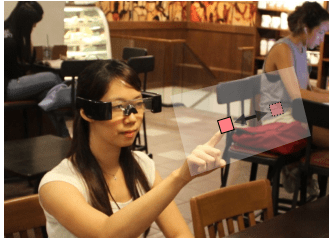
A study participant performing an in-air gesture to drag an object seen through the immersive smart glasses in a public coffee shop.

User-Defined Game Input for Smart Glasses in Public Space

Ying-Chao Tung, Chun-Yen Hsu, Han-Yu Wang, Silvia Chyou, Jhe-Wei Lin, Pei-Jung Wu, Andries Valstar, and Mike Y. Chen. 2015. User-Defined Game Input for Smart Glasses in Public Space. In Proceedings of the 33rd Annual ACM Conference on Human Factors in Computing Systems (CHI ’15). Association for Computing Machinery, New York, NY, USA, 3327–3336.
DOI: https://doi.org/10.1145/2702123.2702214
Backhand

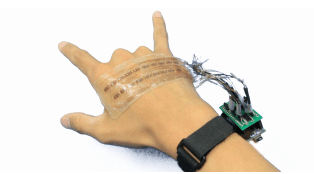
In this paper, we explore using the back of hands for sensing hand gestures, which interferes less than glove-based approaches and provides better recognition than sensing at wrists and forearms. Our prototype, BackHand, uses an array of strain gauge sensors affixed to the back of hands, and applies machine learning techniques to recognize a variety of hand gestures. We conducted a user study with 10 participants to better understand gesture recognition accuracy and the effects of sensing locations. Results showed that sensor reading patterns differ significantly across users, but are consistent for the same user. The leave-one-user-out accuracy is low at an average of 27.4%, but reaches 95.8% average accuracy for 16 popular hand gestures when personalized for each participant. The most promising location spans the 1/8~1/4 area between the metacarpophalangeal joints (MCP, the knuckles between the hand and fingers) and the head of ulna (tip of the wrist).

BackHand: Sensing Hand Gestures via Back of the Hand

Jhe-Wei Lin, Chiuan Wang, Yi Yao Huang, Kuan-Ting Chou, Hsuan-Yu Chen, Wei-Luan Tseng, and Mike Y. Chen. 2015. BackHand: Sensing Hand Gestures via Back of the Hand. In Proceedings of the 28th Annual ACM Symposium on User Interface Software & Technology (UIST ’15). Association for Computing Machinery, New York, NY, USA, 557–564.
DOI: https://doi.org/10.1145/2807442.2807462

PalmType

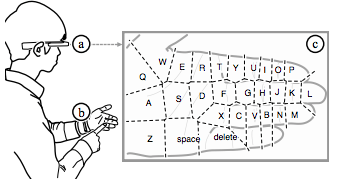
We present PalmType, which uses palms as interactive keyboards for smart wearable displays, such as Google Glass. PalmType leverages users’ innate ability to pinpoint specific areas of their palms and fingers without visual attention (i.e. proprioception), and provides visual feedback via the wearable displays. With wrist-worn sensors and wearable displays, PalmType enables typing without requiring users to hold any devices and does not require visual attention to their hands. We conducted design sessions with 6 participants to see how users map QWERTY layout to their hands based on their proprioception. To evaluate typing performance and preference, we conducted a 12-person user study using Google Glass and Vicon motion tracking system, which showed that PalmType with optimized QWERTY layout is 39% faster than current touchpad-based keyboards. In addition, PalmType is preferred by 92% of the participants. We demonstrate the feasibility of wearable PalmType by building a prototype that uses a wrist-worn array of 15 infrared sensors to detect users’ finger position and taps, and provides visual feedback via Google Glass.

PalmType: Using Palms as Keyboards for Smart Glasses

Cheng-Yao Wang, Wei-Chen Chu, Po-Tsung Chiu, Min-Chieh Hsiu, Yih-Harn Chiang, and Mike Y. Chen. 2015. PalmType: Using Palms as Keyboards for Smart Glasses. In Proceedings of the 17th International Conference on Human-Computer Interaction with Mobile Devices and Services (MobileHCI ’15). Association for Computing Machinery, New York, NY, USA, 153–160.
DOI: https://doi.org/10.1145/2785830.2785886

iGrasp

Multitouch tablets, such as iPad and Android tablets, support virtual keyboards for text entry. Our 64-user study shows that 98% of the users preferred different keyboard layouts and positions depending on how they were holding these devices. However, current tablets either do not allow keyboard adjustment or require users to manually adjust the keyboards. We present iGrasp, which automatically adapts the layout and position of virtual keyboards based on how and where users are grasping the devices without requiring explicit user input. Our prototype uses 46 capacitive sensors positioned along the sides of an iPad to sense users’ grasps, and supports two types of grasp-based automatic adaptation: layout switching and continuous positioning. Our two 18-user studies show that participants were able to begin typing 42% earlier using iGrasp’s adaptive keyboard compared to the manually adjustable keyboard. Participants also rated iGrasp much easier to use than the manually adjustable keyboard (4.2 vs 2.9 on five-point Likert scale.)

iGrasp: grasp-based adaptive keyboard for mobile devices

Lung-Pan Cheng, Hsiang-Sheng Liang, Che-Yang Wu, and Mike Y. Chen. 2013. IGrasp: grasp-based adaptive keyboard for mobile devices. In Proceedings of the SIGCHI Conference on Human Factors in Computing Systems (CHI ’13). Association for Computing Machinery, New York, NY, USA, 3037–3046.
DOI: https://doi.org/10.1145/2470654.2481422

iRotate

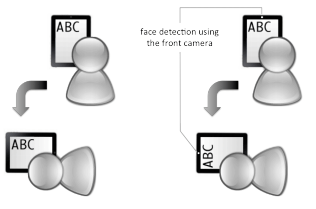
tablets, such as iPad and Android tablets, support virtual keyboards for text entry. Our 64-user study shows that 98% of the users preferred different keyboard layouts and positions depending on how they were holding these devices. However, current tablets either do not allow keyboard adjustment or require users to manually adjust the keyboards. We present iGrasp, which automatically adapts the layout and position of virtual keyboards based on how and where users are grasping the devices without requiring explicit user input. Our prototype uses 46 capacitive sensors positioned along the sides of an iPad to sense users’ grasps, and supports two types of grasp-based automatic adaptation: layout switching and continuous positioning. Our two 18-user studies show that participants were able to begin typing 42% earlier using iGrasp’s adaptive keyboard compared to the manually adjustable keyboard. Participants also rated iGrasp much easier to use than the manually adjustable keyboard (4.2 vs 2.9 on five-point Likert scale.)

iRotate: automatic screen rotation based on face orientation

Lung-Pan Cheng, Fang-I Hsiao, Yen-Ting Liu, and Mike Y. Chen. 2012. IRotate: automatic screen rotation based on face orientation. In Proceedings of the SIGCHI Conference on Human Factors in Computing Systems (CHI ’12). Association for Computing Machinery, New York, NY, USA, 2203–2210.
DOI: https://doi.org/10.1145/2207676.2208374