PhantomLegs

Virtual Reality (VR) sickness occurs when exposure to a virtual environment causes symptoms that are similar to motion sickness, and has been one of the major user experience barriers of VR. To reduce VR sickness, prior work has explored dynamic field-of-view modification and galvanic vestibular stimulation (GVS) that recou-ples the visual and vestibular systems. We propose a new approach to reduce VR sickness, called PhantomLegs, that applies alternating haptic cues that are synchronized to users’ footsteps in VR. Our prototype consists of two servos with padded swing arms, one set on each side of the head, that lightly taps the head as users walk in VR. We conducted a three-session, multi-day user study with 30 participants to evaluate its effects as users navigate through a VR environment while physically being seated. Results show that our approach significantly reduces VR sickness during the initial exposure while remaining comfortable to users.
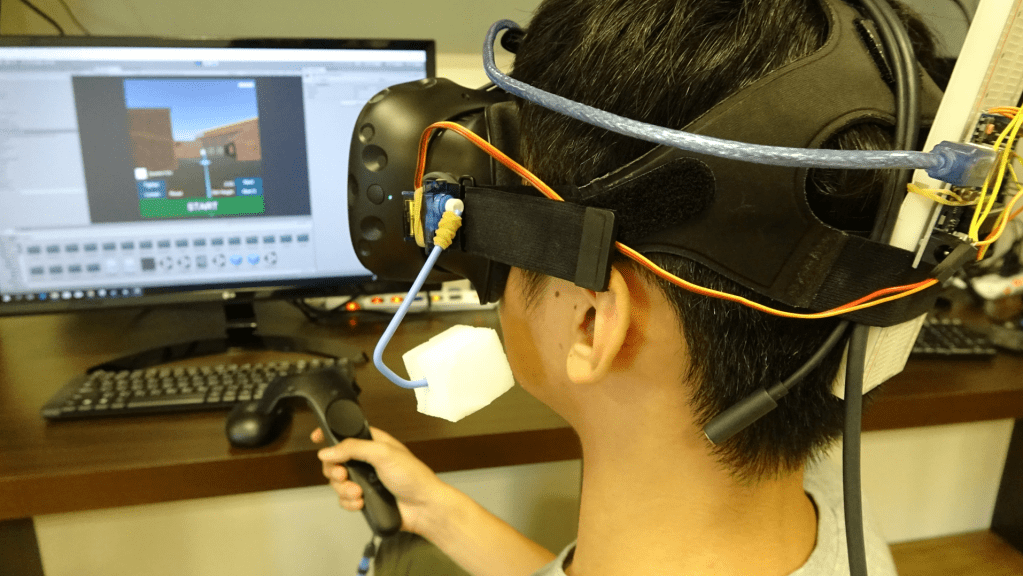
A seated participant navigating in the virtual environment with HTC Vive HMD and controller, assisted by PhantomLegs haptic device.

PhantomLegs: Reducing Virtual Reality Sickness Using Head-Worn Haptic Devices

S. Liu, N. Yu, L. Chan, Y. Peng, W. Sun and M. Y. Chen, “PhantomLegs: Reducing Virtual Reality Sickness Using Head-Worn Haptic Devices,” 2019 IEEE Conference on Virtual Reality and 3D User Interfaces (VR), Osaka, Japan, 2019, pp. 817-826.
DOI: https://doi.org/10.1109/VR.2019.8798158
PeriText

Augmented Reality (AR) provides real-time information by superimposing virtual information onto users’ view of the real world. Our work is the first to explore how peripheral vision, instead of central vision, can be used to read text on AR and smart glasses. We present Peritext, a multiword reading interface using rapid serial visual presentation (RSVP). This enables users to observe the real world using central vision, while using peripheral vision to read virtual information. We first conducted a lab-based study to determine the effect of different text transformation by comparing reading efficiency among 3 capitalization schemes, 2 font faces, 2 text animation methods, and 3 different numbers of words for RSVP paradigm. We found that title case capitalization, sans-serif font and word-wise typewriter animation with multiword RSVP display resulted in better reading efficiency, which together formed our Peritext design. Another lab-based study followed, investigating the performance of the Peritext against control text, and the results showed significant better performance. Finally, we conducted a field study to collect user feedback while using Peritext in real-world walking scenarios, and all users reported a preference of 5° eccentricity over 8°.

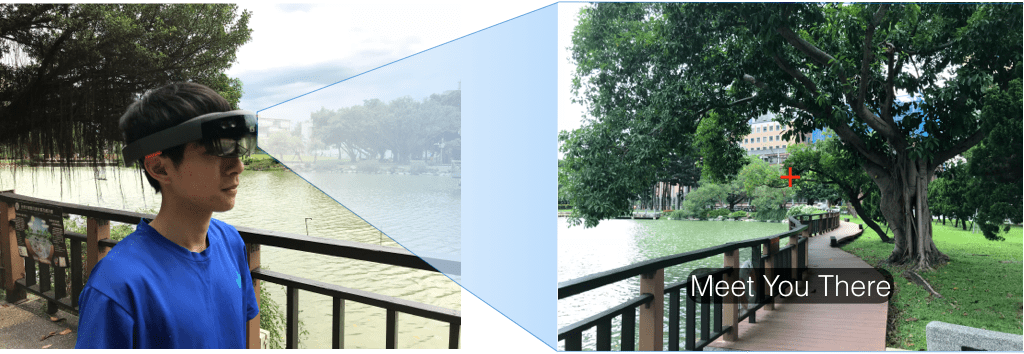
PeriText is a multiword reading interface for peripheral vision on augmented reality smart glasses. While (left) users focus on tasks in the real world such as walking, (right) PeriText provides realtime text information using rapid serial visual presentation, with words sequentially displayed below their center gaze, represented by the red crosshair.

PeriText: Utilizing Peripheral Vision for Reading Text on Augmented Reality Smart Glasses

P. Ku, Y. Lin, Y. Peng and M. Y. Chen, “PeriText: Utilizing Peripheral Vision for Reading Text on Augmented Reality Smart Glasses,” 2019 IEEE Conference on Virtual Reality and 3D User Interfaces (VR), Osaka, Japan, 2019, pp. 630-635.
DOI: https://doi.org/10.1109/VR.2019.8798065